Projects
The Projects section is used to manage projects within the organization. Projects represent specific initiatives, activities, or investments to which budgets, locations, and procurement requests can be assigned.
Overview
- Projects serve as the core structure for procurement planning.
- Each project has its own budget, location, and responsible persons.
- A project can be divided into WBS elements (Work Breakdown Structure) for a more detailed breakdown of the budget and procurement activities.
- The Project Health Card provides a quick overview of the project’s current status.
Viewing the Project List
- The user logs in to the ProcureSwift application.
- In the main menu, navigate to Projects.
- Select Projects.
The Manage Projects screen displays a list of all projects along with basic information. Projects can be filtered by name using the search field.
Creating a New Project
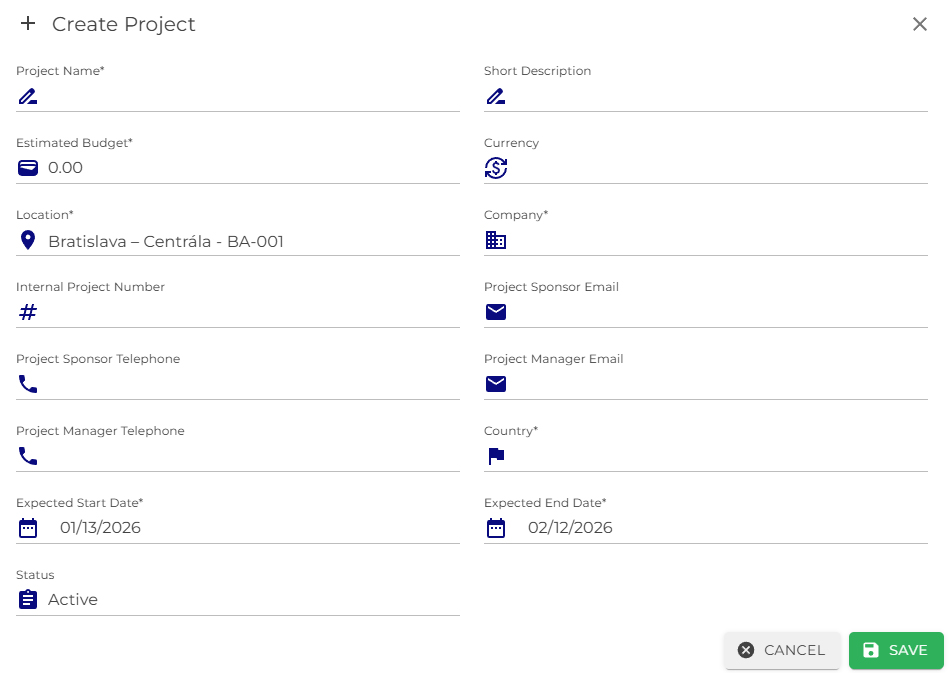
- In the Projects section, click the Create button.
- The Create Project form will open, where the required project details must be completed.
- After filling in the mandatory fields, click Save.
Once saved, the project will appear in the project list.
Editing and Deleting a Project
In the project list, each project includes an Actions menu that allows the user to:
- Edit the project details,
- Delete the project,
- Health Card – view the project status evaluation.
WBS Elements
A project can be further divided into WBS elements (Work Breakdown Structure) — smaller, manageable parts such as project phases, department activities, or cost centers. They help organize budgets, responsibilities, and procurement activities within the project.
For the detailed creation steps, see the WBS Elements guide.