Projects
The Projects section is used to manage projects within the organization. Projects represent specific initiatives, activities, or investments to which budgets, locations, and procurement requests can be assigned.
Overview
- Projects serve as the core structure for procurement planning.
- Each project has its own budget, location, and responsible persons.
- The Project Health Card provides a quick overview of the project’s current status.
Viewing the Project List
- The user logs in to the ProcureSwift application.
- In the main menu, navigate to Projects.
- Select Projects.
The Manage Projects screen displays a list of all projects along with basic information. Projects can be filtered by name using the search field.
Creating a New Project
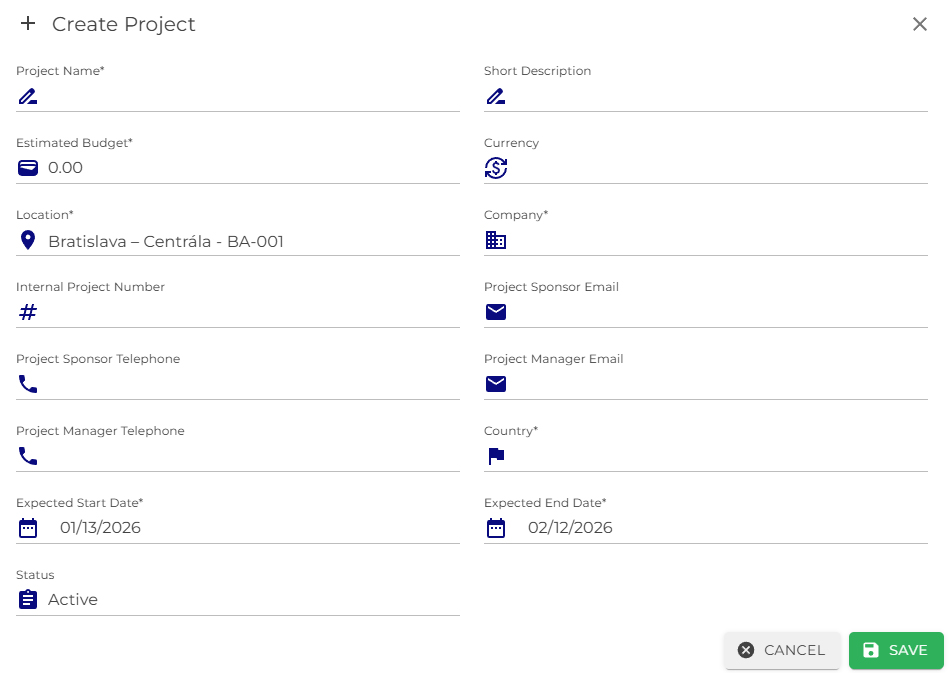
- In the Projects section, click the Create button.
- The Create Project form will open, where the required project details must be completed.
- After filling in the mandatory fields, click Save.
Once saved, the project will appear in the project list.
Editing and Deleting a Project
In the project list, each project includes an Actions menu that allows the user to:
- Edit the project details,
- Delete the project,
- Health Card – view the project status evaluation.